
Are You Pinteresting?
This page may contain links to Amazon.com or other sites from which I may receive commission on purchases you make after clicking on such links. Read my full Disclosure Policy
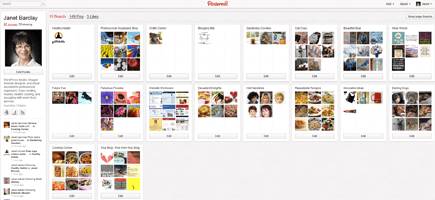
New social media sites are cropping up all the time and it seems like I’m being invited to join something-or-other nearly every week. Since it’s unrealistic to try and maintain an active presence everywhere, I tend to wait and see whether a particular site is going to be worth my while before jumping on the bandwagon. Such was the case with Pinterest.
If you haven’t had a chance to check it out, here’s how Pinterest describes itself:
Pinterest lets you organize and share all the beautiful things you find on the web. People use pinboards to plan their weddings, decorate their homes, and organize their favorite recipes.
Best of all, you can browse pinboards created by other people. Browsing pinboards is a fun way to discover new things and get inspiration from people who share your interests.
You can almost think of Pinterest as an online bookmarking service, but instead of saving titles of blog posts and web pages that you like, you save an image from the page along with a note about it. Once pinned, the image retains a link back to the original website. You can pin images from any website, and you can even “repin” images that other users have pinned, whether you are following them or not.
A lot of my clients and other contacts were talking about Pinterest, so I signed up, but didn’t immediately see it as a business marketing tool.
I quickly realized that Pinterest is a great way for professional organizers to showcase their organizing projects and their favorite organizing products. Here are just a few of the really great boards I’ve seen:
- Heather – Moving On Organizing: Libraries & Bookcases
- Clare Kumar: Organized Under the Stairs
- Helena Alkhas: Decorate | Home Office
I decided to create a few boards to reflect my personal interests so I could get a feel for how it works, and it didn’t take me long to realize why Pinterest is so popular and so addictive. I was having trouble figuring out how I could use it to promote my business, however, until Clare Kumar suggested that I post some screenshots of websites I’ve designed. It’s not a complete collection, but I think I’m off to a pretty good start!
I’ve also created a Professional Organizers Blog Carnival board with links to all the Carnivals, going back to the very first one in June 2009.
Over the past few weeks, Pinterest has been making big headlines, not just in social media circles but on major business websites like Forbes, Fast Company, and The New York Times, and I’m convinced that it’s going to be an essential marketing tool for promoting your organizing business.
Are you on Pinterest? If so, please post your user name in the Comments section, and let us know how you’re using it. And be sure to follow me on Pinterest too!


Hi, Janet.
I recently joined Pinterest! My boards are at: http://pinterest.com/staceyamurray.
I’ve been ‘pinning’ to show my blog posts, my favorite organizing books and products, and I’ve created a board for a book I’m in the process of writing.
I’m a visual person so I’m really enjoying it. I’m off to check out your boards!
Stacey Agin Murray
Organized Artistry, LLC
Looking good, Stacey! Writing a book about organizing a wedding sounds like a fun project and I’m sure there will be a good market for it too.
I tried to join last week but hav a problem with my user three letter login it seems really interestiong and I know I have to join because janet hasendorsed it!!
Maybe you can start over with a different login? You’ll love it – hopefully not so much that you’re cursing me for recommending it… 🙂
Just received an email informing me “that you CAN upload an image directly to pinterest, it does not need to exist somewhere in cyber space. From your Pinterest page, click on ‘add’ in the tip left corner. A box will pop up where you can select to upload a file.”
Good to know! Though it’s much more fun if the picture goes somewhere, don’t you think?
Hi Janet,
I’m a HUGE fan of Pinterest! It combines two of my favorite things: organization and beautiful visuals. My boards combine relate to organizing ideas other interests like color, parenting, humor, sparkly things, and social media.
Here’s a link: http://www.pinterest.com/ohsoorganized/
I’ve been using Pinterest for about 1-1/2 years.
This is what I’ve noticed since adding this platform to my Social Media mix:
– E-newsletter subscriber sign-ups increased
– Book sales for The Other Side of Organized specifically from Pinterest followers occurred
– Blog and Facebook interactions increased
– Lots of activity with Pinterest users repining my pins
– Multi-platform interactions increased, driven by Pinterest followers
– Pinterest followers increased
My favorite part about Pinterest is that it’s paints an immediate picture. You get an instant visual sense about a company or person. For me pictures work faster than words. I can take in a lot just by looking.
Linda, thanks so much for the detailed comment. I’ve been following you on Pinterest for ages, and I love the way you’ve set up your boards. It’s Oh, So Well Branded! 🙂
You’re welcome, Janet. And thank you your positive feedback about my Pinterest boards (and how they’re branded.) I’m a definite Pinterest enthusiast, but recognize it’s not for everyone. That’s really true of all social media platforms. You’ll naturally find yourself gravitating more some more than others. My three favorites: Blog, Pinterest, Twitter.
How about you?
It’s no secret that I love to blog, and much of my social media activity is related to my blog. I like Twitter because it’s so easy to share content using tools like Pocket, Buffer, and Tweetily, but I tend to engage more with others on Facebook. I get lots of traffic from Pinterest, but I don’t know if there’s much direct benefit to my business.