
Product Review: 2026 momAgenda Planner
This page may contain links to Amazon.com or other sites from which I may receive commission on purchases you make after clicking on such links. Read my full Disclosure Policy
I’ve used more planning systems—both paper and digital—than I can count. (Feel free to read about my time management journey from 1984 to 2016 if you’re curious.) Although I’ve relied mostly on digital tools since then, I’ve never stopped admiring beautiful planners.
To satisfy that longing, I’m rediscovering one of the best planners I’ve used: momAgenda. They sent me a momAgenda Desktop 12-Month Planner for 2026, and I’m excited to share the details with you.
The Cover
I chose the Moonlit Navy cover, because navy is one of my favourite colours (I know, I’m boring…), but it also comes in Blush Python if you prefer something a little less conservative. The vegan leather has a subtle texture that’s incredibly pleasant to the touch, and the overall quality is excellent.
Weekly Planning Pages
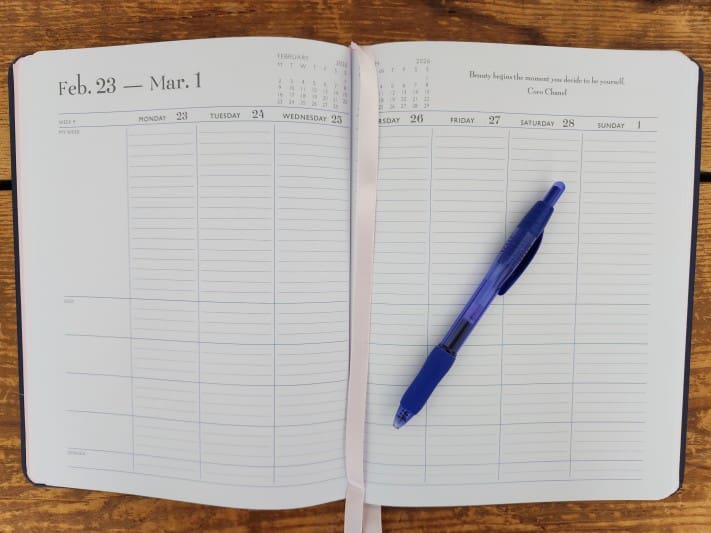
The weekly layout is my favourite feature of momAgenda planners. Each two-page spread includes eight columns: one for each day and one labelled “Notes” for anything that spans the entire week. At the top of each spread, you’ll find mini calendars for both the current and upcoming month, plus a motivational quote.
Each column is divided into two parts: the upper “My Week” section, and a lower section split into four smaller blocks. It’s wonderfully flexible and easy to adapt to whatever your days look like.
Before I switched to digital tools, I used a myAgenda planner and divided my pages into daytime activities, evening plans, blog topics, meal ideas, and exercise. It worked beautifully.
These days, even though my digital tools do the heavy lifting, I’ve found a great way to use my new momAgenda alongside them. I’ve never found an effective way to organize my blogging and social media, and I’m confident that I can streamline my activities by dedicating one section per platform.
Additional Planning Pages
You know that annoying moment near the end of the year when you need to jot down appointments for the following year? momAgenda has thought of that.
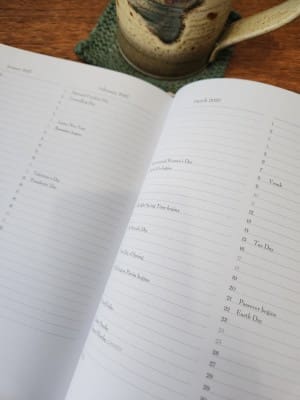
After the December pages, you’ll find an advance planning section — two months per page — with holidays pre-marked and space for notes.
You’ll also find full-page yearly calendars for 2026 and 2027 for quick reference, plus monthly calendars with plenty of room to write.
Each monthly page also includes the previous and next month at a glance, and another quote at the top.
Additional Pages
At the front of the planner, you’ll find pre-printed pages for family information, important phone numbers, passwords, medical details, birthdays, and anniversaries. Of course, use your judgment about what you’re comfortable carrying around.
At the back, there’s a generous supply of lined pages for anything that doesn’t have a dedicated spot elsewhere.
Accessories
Along with my planner, I received a set of monthly adhesive tabs, which will make it much easier to flip to the right spot. Not surprisingly, the tabs are the same high quality as the planner itself.
Other accessories are available too, including planner pockets, an adhesive pen holder, a magnetic bookmark, and gold metal page markers.
Not Just for Moms
If “Mom” isn’t your primary role, you might wonder whether momAgenda is too kid-focused. Personally, I find the word “Kids” on the weekly pages small and easy to ignore.
Or, you might prefer the myAgenda Desktop 18-Month Planner, which has a nearly identical layout but without family-specific labels. I’ve used this version before, and the quality is just as good—plus it comes in more colours.
Just in Time for 2026
I don’t have details yet, but a little bird told me that momAgenda will be offering Black Friday and Cyber Monday deals.
And, you can save 15% anytime by entering JANETBARCLAY at checkout when your order is $45 USD or more. There’s no expiry date, but the code can only be used once per customer.
If you’re still looking for a 2026 planner for yourself, a client, or someone else, I hope this review has given you a good sense of whether momAgenda might be a fit. If you have any questions, feel free to ask!


I like that weekly layout as well. It looks like it has space for calendar items at the top, and then you could put your to-dos in that lower section, and maybe the meal plan for the day at the very bottom. I also tend to track where in the world my husband is in a lower section like that (since he travels all the time), and sometimes even note special events in other people’s lives that I want to remember.
Great having that option for recording items for the new year. That is a thing!!!
That’s almost exactly how I used those sections when I was using my planner for everything. It’s so much easier to have similar things grouped together, especially if you like to batch telephone calls or other tasks.
I am a fan of weekly calendar planners – I started using them in high school and love the way I can see a little bit ahead of today, but not so much that it overwhelms me. Thanks for sharing your experience with momAgenda.
So far it sounds like weekly planners are a popular choice! Thanks for your comment and the link to your planner-related blog post.
I find that for my own purposes, I mainly use my monthly pages calendar and a daily sticky note such that my daily pages often go unused (except for archiving the sticky note). However, every year, I reconsider whether I’ll get something like a Planner Pad, as the weekly view is always so appealing, but I can also can divide tasks from scheduled events. Thus, I really like that this weekly layout for the MomAgenda isn’t merely columns of scheduled hours, but appears to have flexibility. You could easily replace “kids” and “dinner” with categories that are more applicable. And, of course, for actual moms, it’s good as-is. 😉
Yes, the flexibility is fantastic! I used to hate planners where most of the page is appointment slots with a tiny space at the bottom for everything else. I’m sure they work for people whose work or lives are appointment-driven, but since most of my things aren’t scheduled for set times, it’s a total waste of space! (Yes, I could ignore the printed times, and have done so before, but it’s much nicer if they’re not there to begin with!)
They also offer MyAgenda for those of us who aren’t moms (or whose kids are grown up), but it only seems to be available in the 18-month format.